Transform photos into artistic styles with ease
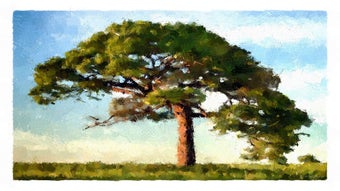
FotoSketcher, developed by David Thoiron, is an application designed to convert ordinary photos into various artistic styles. It offers a range of artistic effects, including pencil sketches, watercolors, oil paintings, abstract art, and cartoons. The software processes images quickly, delivering results in just seconds. Users can adjust parameters and image settings such as contrast, lighting, and saturation to customize the output according to their preferences.
Top Recommended Alternative

Efficient artistic transformations with custom controls
FotoSketcher focuses on quickly turning photographs into different art styles, making it accessible for users looking for fast and effective results. Its variety of effects covers multiple artistic techniques, from delicate pencil drawings to colorful watercolor and oil paint renditions. Other effects included in the software are dot painting, photo-to-stamp, mosaic, and frame effects.
The software allows users to fine-tune the applied effects, ensuring that each artistic creation matches their desired look. Additionally, basic image enhancement tools help improve aspects like lighting and contrast, adding more control over the final image. The program supports saving images in common graphic formats, including JPEG, PNG, and BMP, with the ability to handle high-resolution images.
Clear visual comparisons and user-friendly interface
A notable feature of FotoSketcher is the option to view the original photo alongside the edited version in a side-by-side display. This helps users clearly see the changes and better evaluate their adjustments. The user interface, while relatively simple, is rather outdated and not visually modern. Achieving high-quality results often requires significant manual fine-tuning of multiple parameters for each effect, which requires extra time for a polished final image.
A reliable tool for creative photo editing
FotoSketcher delivers on its core function of converting digital photos into various artistic styles. Its combination of multiple effect styles and adjustable parameters provide a solution for users seeking artistic image transformations. Overall, the software program offers consistent and focused functionality aimed at enhancing images creatively and efficiently.